
OpenAI Introduces "Lockdown Mode" in ChatGPT to Protect Users


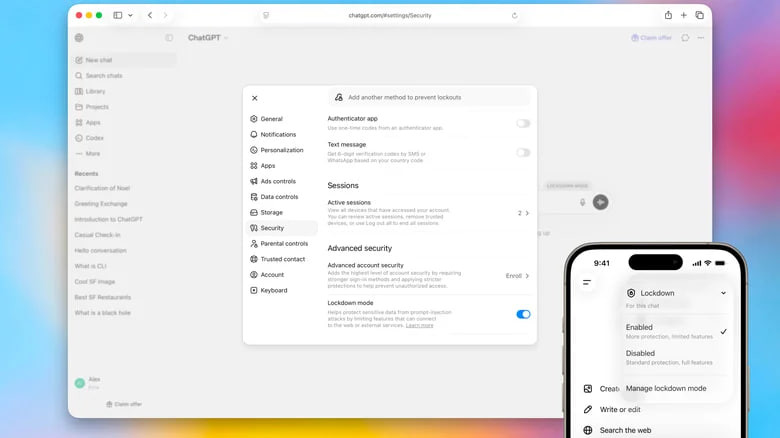










OpenAI announced the implementation of a new "Lockdown Mode" in ChatGPT and its other products, designed to provide additional protection against prompt injection attacks. Engadget reports on this.
This refers to a chatbot-specific type of attack where malicious instructions are hidden in web pages or other data sources to trick artificial intelligence into performing unwanted actions.
OpenAI notes that Lockdown Mode is an additional security layer and acts as a "last line of defense" against such threats. Its goal is to prevent the final stage of attacks, where attackers try to access data through network requests, thereby limiting the possibility of confidential information leakage.
The company emphasizes that the mode is not mandatory for all users and is primarily intended for those working with sensitive data who require enhanced security control.
What "Lockdown Mode" Changes
After activation, some ChatGPT features become limited:
- users can create images and upload their own photos;
- the system does not load images from the internet or display them in responses;
- file analysis through automatic uploads becomes unavailable, but documents can be added manually;
- Deep Research and Agent Mode functions are completely disabled.
At the same time, OpenAI clarifies that the mode does not change memory settings, file upload capabilities, or conversation sharing features. Some parameters remain under the control of workspace administrators.
It is also noted that Lockdown Mode does not block the mere presence of prompt injection in the content processed by ChatGPT but makes it harder to use such instructions to gain access to sensitive data over the network.
The feature is already available for all personal accounts, including the free version of ChatGPT. To activate it, go to settings, open the "Security" section, and enable "Lockdown Mode" in the "Advanced Security" section.
Subscribe to our Telegram channel t.me/sudua and to Google News SUD.UA, as well as to our VIBER and WhatsApp, and follow us on Facebook and Instagram to stay updated on the most important events.