
E-veteran ID in Diia: Ukrainians were explained the main questions


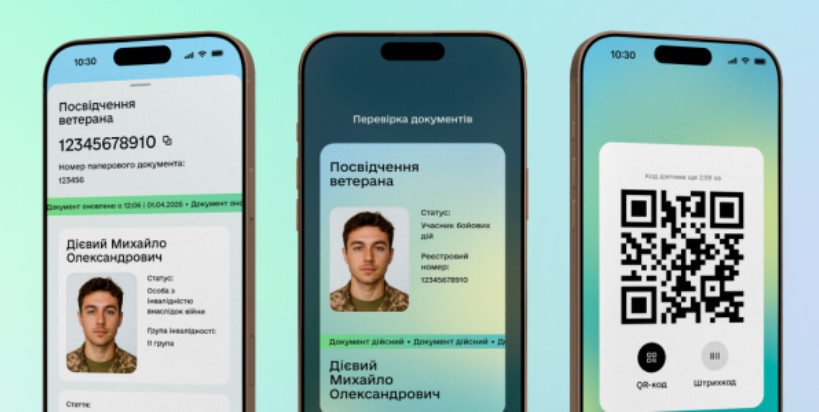










As previously reported by the "Judicial and Legal Newspaper", the e-Veteran ID in Diia is now available without a paper document.
The Ministry of Veterans Affairs answered the main questions regarding the display of the e-Veteran ID in Diia.
How the e-Veteran ID should be displayed in Diia
Option 1: You already have a paper ID in hand. In this case, Diia will display both the number of your paper document and the new 11-digit registry number. Nothing has disappeared; your physical UBD ID number remains in place.
Option 2: You have just received the status and do not yet have a paper document. Your e-ID will display only the 11-digit registry number. But you can already fully use all digital services and benefits without waiting for the paper document to be printed and handed to you.
Answers to the main questions
▪ What is this 11-digit "registry number"? It is not a new status or a new document. It is a unique number of your record in the computer database — the Unified State Register of War Veterans (USRWV). Simply put: it is the code under which the system stores information that you are officially a veteran.
▪ Are paper IDs being canceled? No, paper booklets remain fully valid. You can use them as before wherever required by law. Digitalization simply provides an alternative without paper hassle.
▪ Where to view information in the Diia app?
The e-ID (document card) is located in the "Documents" section. To add it to Diia, you need to click "Add document" and select "Veteran ID".
All your detailed data from the database (including the series/number of the paper form, if available) is accessible in the "Veteran Pro" section — the "Data from the veterans register" service.
If the e-ID did not appear or the data is incorrect
This may mean that the military unit or another authorized institution has not yet entered your data into the electronic Register or made an error during entry.
▪ What to do: contact the authority that granted you the status (for example, your military unit) to update or correct the information in the system. For additional questions, you can contact the Unified Veterans Line: 0 800 505 217.
The Ministry of Veterans Affairs added that if a person does not have a digital photo in Diia (ID card or foreign passport), the e-Veteran ID will not be displayed.
Subscribe to our Telegram channel t.me/sudua and to Google News SUD.UA, as well as to our VIBER and WhatsApp, Facebook page Facebook and on Instagram to stay updated on the most important events.